
The faceplate, part by part
The window is laid out like the front of an Icom radio: a display in the middle, keys and a knob on each side, and a row of soft keys along the bottom of the display.
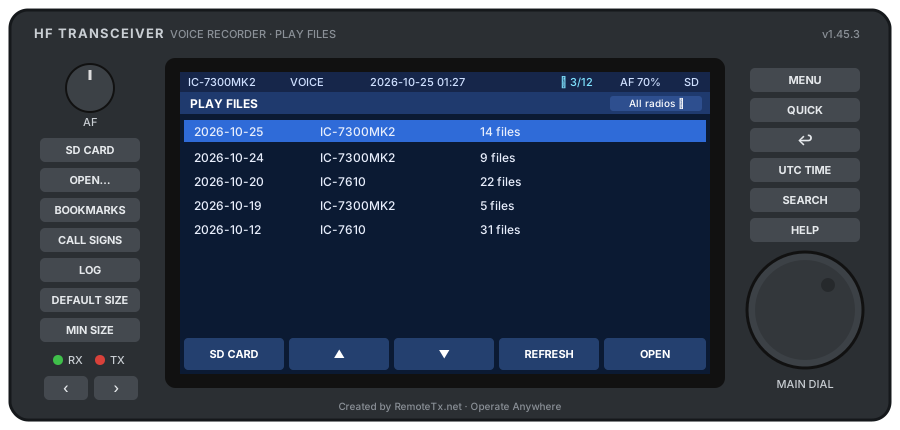
Knobs#
| Knob | Mouse | Keyboard |
|---|---|---|
| AF (volume) | Right-click = up, left-click = down (hold to keep turning), or scroll or drag | + / − |
| MAIN DIAL | Right-click = clockwise, left-click = counter-clockwise (hold to keep turning), or scroll or drag. The mouse wheel over a list also moves the selection | ↑ / ↓ |
In a list the MAIN DIAL moves the selection. On the play screen it seeks one second at a time.
Left side#
| Key | What it does |
|---|---|
| SD CARD | The SD CARD screen: scan, link, unlink and name cards |
| OPEN… | Pick a card or folder (Ctrl+O) |
| BOOKMARKS | Every bookmarked recording. Press again to leave |
| CALL SIGNS | Every call sign found in the transcripts. Press again to leave |
| LOG | The QSOs in your imported logs, and the recordings around each. Press again to leave |
| DEFAULT SIZE | Put the window back to 1100 × 560, centred (Ctrl+0) |
| MIN SIZE | Shrink the window to 760 × 460 (Ctrl+9) |
| RX / TX LEDs | Light while a received or transmitted recording plays |
| ‹ › | Back and forward through every place you've been: folders, file lists, bookmarks, search, call signs, files played. The mouse's back and forward buttons and Alt+← / Alt+→ do the same |
Right side#
| Key | What it does |
|---|---|
| MENU | The folder list (Home) |
| QUICK | The Quick menu for the current screen (Q). See below |
| EXIT (↩) | Back one level (Esc, Backspace or ←; on CALL SIGNS and LOG, Esc only) |
| UTC TIME / LOCAL TIME | Show times in UTC or local time (T) |
| SEARCH | Open the search screen (Ctrl+F). Yellow while a search is filtering: press it again to turn the search off |
| HELP | Open this manual in your web browser (F1) |
The display#
- Status bar: radio model, what's playing, the recording's date and time, background transcription progress (✎ n/total), AF level, and the SD indicator.
- Title bar: the screen's name on the left. On some screens the right side holds filter buttons such as All radios ▾, Conf ≥, Mode ▾ or Dates ▾. They turn yellow while filtering.
- Screen: the list or the player.
- Soft keys: five keys along the bottom whose labels change with the screen.
Soft keys on each screen#
| Screen | Soft keys |
|---|---|
| PLAY FILES (date folders) | SD CARD · ▲ · ▼ · REFRESH · OPEN |
| A folder's files | FILTER · ▲ · ▼ · AUTO (or MODIFY on search results) · ▶ PLAY |
| Play screen | |◀◀ PREV · ◀◀ −5 s · ▶ PLAY / ❚❚ PAUSE · ▶▶ +5 s · ▶▶| NEXT |
| Search | CLEAR · RX/TX · RX S-LEVEL · APPLY · CANCEL |
| Bookmarks | NOTE · ▲ · ▼ · REMOVE · ▶ PLAY |
| Call signs | SORT · ▲ · ▼ · LISTS · OPEN |
| Log | SORT · ▲ · ▼ · OPTIONS · AUDIO |
AUTO turns on auto next: when a file ends, the next one in the list starts, so a folder plays as one continuous QSO. FILTER limits a list to RX or TX, or to RX recordings above an S-level.
The play screen#
Besides the soft keys, the play screen has:
- ☆ / ★: bookmark the recording (B).
- TXT: transcribe voice and CW recordings the first time they play. The text follows the audio as a two-line caption.
- + CALL: tag the recording with a call sign you hear (C). Next to it, ✎ edits the recording's call signs.
- ▤ SHOW FOLDER: when playing from bookmarks, search results, a call sign or the log, open the recording's own date folder with it selected, to hear what came before and after (G).
- The waveform: click it to jump to that point.
Keyboard#
| Action | Keys |
|---|---|
| Move selection | ↑ ↓ |
| Open folder / play file | Enter, → |
| Back | Esc, Backspace, ← (on CALL SIGNS and LOG, Backspace only edits the search box: use Esc) |
| Back / forward through history | Alt+← / Alt+→ |
| Play / pause | Space |
| Seek −5 / +5 s (Shift = 15 s) | ← → on the play screen |
| Previous / next file | ↑ ↓ or PgUp / PgDn on the play screen |
| Volume | + / − |
| RX/TX filter | F |
| RX S-level filter | S |
| Auto next | A |
| Search | Ctrl+F (Enter = apply, Esc = cancel) |
| UTC / local time | T |
| Bookmark | B |
| Show folder | G |
| Add a call sign | C |
| Show one radio | R |
| Quick menu | Q |
| Open this manual | F1 |
| Open card or folder | Ctrl+O |
| Default / minimum window size | Ctrl+0 / Ctrl+9 |
Quick menu#
QUICK opens a menu of everything that applies to the current screen and the selected file. The main items:
| Group | Items |
|---|---|
| Playing | Auto Next, RX/TX Filter, RX S-Level Filter |
| Bookmarks | Bookmark / remove bookmark, Edit Note…, Bookmarks…, Sort Bookmarks, Export Bookmarked Files…, Remove All Bookmarks |
| Transcription | Transcribe on Play, Transcribe This File, Show Transcript…, Re-transcribe This File, Delete Transcript, Transcribe All in This List / Stop Transcribing, Speech Model, Call-Sign Boost |
| Call signs | Call Signs Heard…, Recompute Call Signs, Transcript Database…, Call Signs in This Recording…, Add a Call Sign to This Recording… |
| The file | File Information, Export File…, Show in Explorer (Finder on a Mac) |
| Search | Edit Search…, Clear Search |
| App | Refresh, Select SD Card, Open Folder…, Time Display, Radio Clock Is, Default / Minimum Window Size, App Version, Factory Reset… |
What's remembered#
Volume, filters, auto next, linked cards, window size and every list's filters are saved. On restart the player goes back to exactly where you were: the folder list, a folder, the search form, search results, or the player at the same position, playing if it was playing.