
HRD Logbook rig control
New in EasyConnect 2.2.0.
HRD Logbook and DM780 normally get the radio's frequency and mode from HRD Rig Control, over TCP port 7809. EasyConnect can answer on that port itself, so HRD Logbook follows your RemoteTx radio without HRD Rig Control running at all.
To HRD Logbook, EasyConnect looks like HRD Rig Control with a Kenwood TS-480 connected. Behind it, frequency and mode go to and from your real radio through the radio link.
Setting it up#
- Close HRD Rig Control. It uses the same port, so only one of them can listen on 7809.
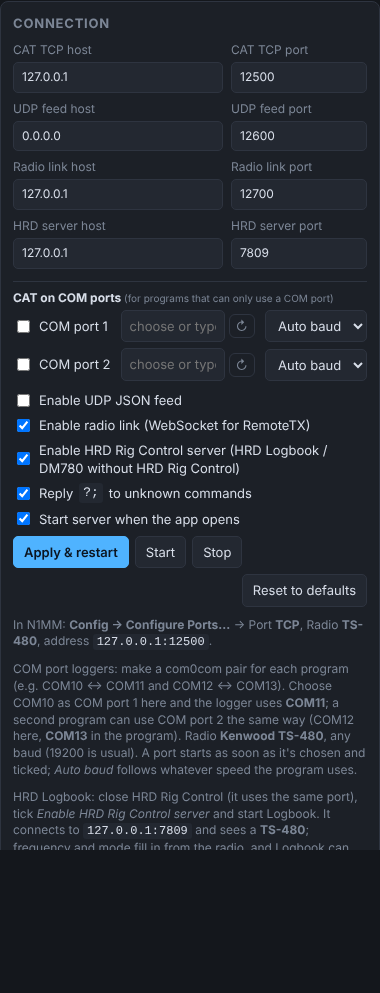
- In EasyConnect, under Connection, tick Enable HRD Rig Control server. Leave HRD server host
127.0.0.1and HRD server port7809, and click Apply & restart. - The HRD pill shows
HRD: 127.0.0.1:7809. - Make sure the radio is linked: EC on in RemoteTx, and the Radio link pill showing your radio.
- Start HRD Logbook. It connects to
127.0.0.1:7809and sees a TS-480. The pill shows the number of connected clients, e.g.HRD: 127.0.0.1:7809 (1).
What HRD Logbook can do#
| In HRD Logbook | Result |
|---|---|
| The frequency and mode fields | Follow the radio as you tune, in RemoteTx or on the radio itself. |
| Change the frequency (QSY), or double-click a DX cluster spot | The radio tunes there. |
| Change the mode | The radio changes mode (LSB, USB, CW, CW-R, FM, AM, FSK, FSK-R). |
| Split on / off, VFO A / B | Set on the radio. |
| TX button | Keys the radio. |
Meters and sliders aren't emulated: HRD Logbook only needs frequency and mode for logging.
Using it with FT8#
The HRD server and FT8 to loggers are independent and work well together:
| Path | Port | What HRD Logbook gets |
|---|---|---|
| HRD Rig Control server | 7809 | Frequency and mode of the radio, all the time |
| FT8 → loggers (WSJT-X UDP) | 2237 | FT8 decodes, and QSOs logged in the RemoteTx FT8 tab |
With both on, HRD Logbook shows the right frequency while you operate any mode, and logs FT8 QSOs straight from the FT8 tab.
In the log#
EasyConnect's Log and Commands seen list every request from HRD Logbook with an HRD prefix: HRD get freqx, HRD set frequency-hz, HRD set dropdown… HRD Logbook keeps asking for the frequency and mode; tick Hide routine polls to hide those reads. Anything EasyConnect doesn't emulate is marked UNKNOWN.
The log also says which protocol HRD Logbook is using: HRD protocol: v5/v6 (binary) for current versions, or v4 (text) for older ones. Both work.
Logbook on another PC#
To let HRD Logbook on a different computer connect, set HRD server host to 0.0.0.0, click Apply & restart, and allow EasyConnect through the firewall. In HRD Logbook, use this computer's LAN address (shown in EasyConnect's header) with port 7809.